









Admin Controls in Connect Frontline now includes a permissions matrix that shows exactly what Tenant, Site Group and Site Admins can do, and an Admin Activity log of every admin action. A new Notifications panel tells admins when something needs attention and links to the screen where it can be fixed.
Admin Controls solves three problems that we've been seeing across a number of organisations: no consistent record of who had admin access or when a change was made by each user, admin permissions were hard to limit to a specific brand or site, and setup decisions were scattered and hard to review at a later time.
Updates to notifications help solve two additional issues. As new data sources were introduced, along with new target platforms, failed syncs and accounts needing review were occasionally discovered too late, and admins weren't able to tell which alerts had already been dealt with.
Sets who has access and what they can do
Settings covers admin accounts, roles and permissions, and an audit trail of admin activity. It also holds the platform choices made once at setup: access model, activation model, employee ID generation, branding and notifications.
Admin views are scoped by role. A Site Admin sees their sites, and a Tenant Admin sees the whole organisation. Scope matters most in groups like Fagerhult Group, where 16 independent brands each keep local admin while group IT has visibility over who has access to what.
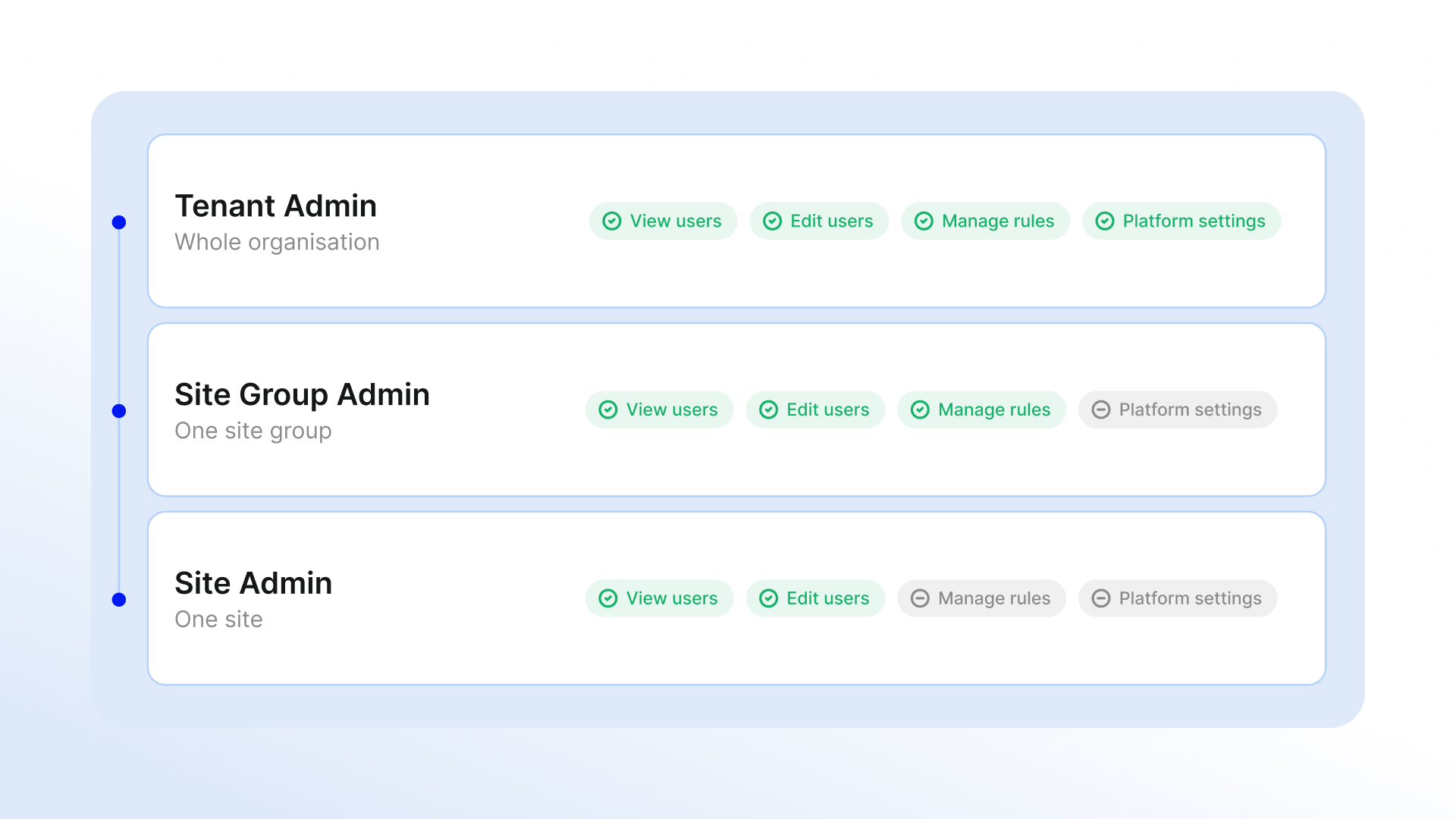
The permissions matrix shows what each admin role can do
The permissions matrix shows exactly what Tenant, Site Group and Site Admins can do.
New admins are invited with their role and scope set from the start, so an admin responsible for one brand or site begins with limits already in place.
Admin Activity logs every admin action, with expandable detail. This ensures there is a clear record of who currently has or had admin access and what they changed.
Notifications tell admins what needs attention
The notifications panel includes the latest items that require attention, with each item linking through to the screen where the problem can be reviews. Notifications include errors, warning or general info, with a clear lead sentence and a timestamp on each item.
While a small update, this improvement works towards our overarching goal of enabling IT teams to take immediate action and respond to events as quickly as possible, while also working towards simplifying the user experience inside the platform overall.
Get started
Admin Controls and Notifications are released and available in the Connect Frontline admin console.
To see the permissions matrix against your own admin structure, book a demo with a Connect Frontline team member.